External Mod Event
Handles messages sent to Sentinel by other non-Sentinel mods.
Identity
- Event Name: This is the name of the event the mod has sent. The mod author may choose any naming convention they choose, so refer to the mod’s documentation for the correct values.
Accessing The Event Data
Use beacon.eventData.modEventName and beacon.eventData.modEventData to access the data sent by the mod. modEventName will be a string matching the name of the event listed in the identity section above, and modEventData will be a json object of the mod author’s choosing.
For Mod Authors
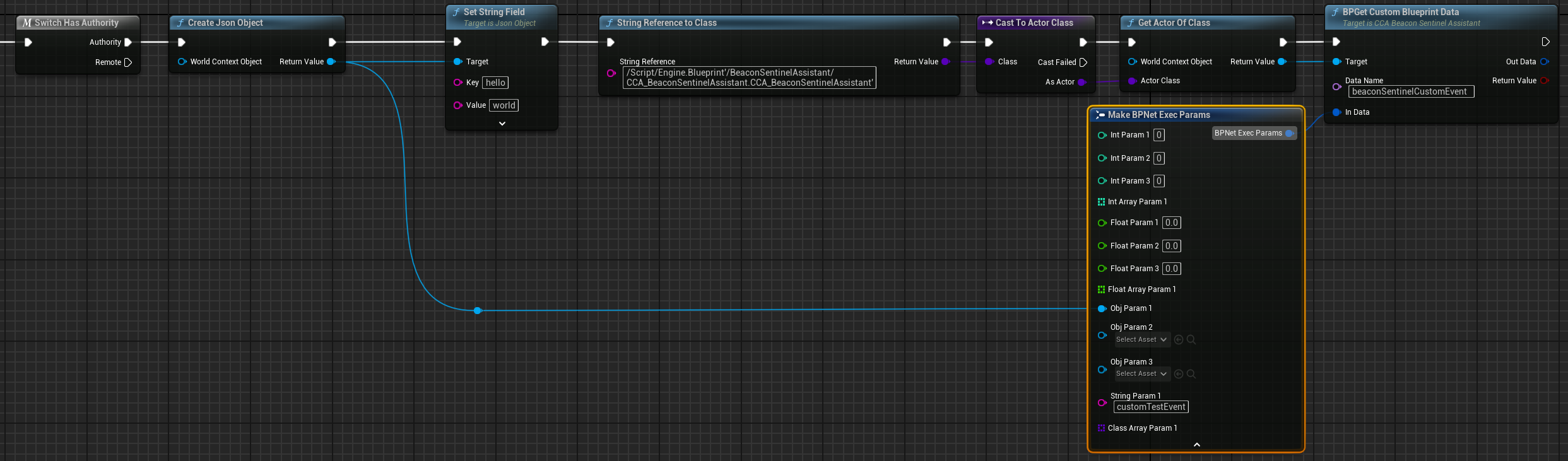
The Beacon Sentinel Assistant mod’s CCA path is the very predictable /Script/Engine.Blueprint'/BeaconSentinelAssistant/CCA_BeaconSentinelAssistant.CCA_BeaconSentinelAssistant'. The class also has a custom tag of BeaconSentinelAssistantCCA. Using either the path with StringToClass and GetActorOfClass, or the tag with GetAllActorsOfClassWithTag to obtain a reference to Sentinel CCA.
Use the BPGetCustomBlueprintData function to actually send an event. Set the Data Name parameter to beaconSentinelCustomEvent. Make a BPNetExecParams struct with your custom event name in String Param 1 and the JSON object to send in Obj Param 1. You must send a JSON object, or the message will be ignored. If the message is ignored, the return value will be false and the reason will be listed in the String Param 1 value of Out Data.
Tips For Success
- Of course, the server may not have Beacon Sentinel installed. Make sure to check the validity of classes and instances.
- Check for authority before doing any of this work. No direct harm will come from performing this work on the client, but the mod will ignore messages sent from clients. So don’t waste the CPU cycles.
Example Nodes
The nodes in the screenshot can be viewed at blueprintue.com.